Menu


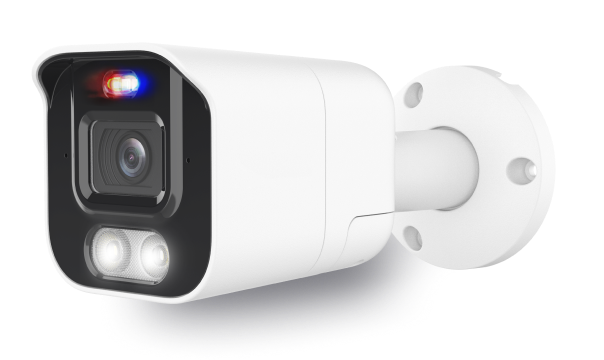
With the growing need for smarter, more connected security systems, Angelcam offers a versatile solution with its AngelCamera Two, a 'plug-and-play' security camera that talks, deters and protects. It also works as a gateway that connects IP cameras from other brands to a single, reliable cloud-based monitoring platform, delivering smart monitoring with a focus on simplicity, security, and scalability.
Whether you're managing security for a small business or a multi-location company, here’s how to get your AngelCamera Two up and running—and why it could be the key to elevating your security strategy.
Angelcam’s AngelCamera Two arrives ready for action. Ethernet cables, a PoE switch, a router and a power adapter are not included in the box, so have them ready before you start. Designed for quick deployment, the setup process is straightforward:
Secure the camera to a wall or ceiling using the supplied screws and bolts, and adjust the angle with the included Allen wrench for optimal coverage. For outdoor setups, use the provided plastic cover to ensure a rain-proof installation.
Before connecting the camera, make sure you've created your Angelcam account, activated the Essentials Plan, and downloaded the Angelcam app on your smartphone. Then, proceed as follows:
Pro Tip: Complete the setup within the first 20 minutes after powering on your AngelCamera Two. If the initial configuration isn't finished within this time frame, the device will automatically require a restart to ensure its secure connection protocols are maintained. This safeguard helps prevent unauthorized access and ensures your setup process remains secure.
Angelcam has packed the AngelCamera Two with features aimed at simplifying security and maximizing functionality:
AngelCamera Two is not just a standalone product—it’s an entry point to the broader Angelcam ecosystem. Start with a 21-day free trial of the Essentials Plan and experience all the benefits of a smarter, more connected security solution:
AngelCamera Two is designed to grow with your needs. With the Essentials Plan it connects up to 10 cameras on the local network and offers scalable options for larger setups. As your surveillance needs grow, you can upgrade to Angelcam's Business Plan for unlimited camera connectivity and advanced features, providing a flexible solution for any security infrastructure.
Additionally, you can expand your security capabilities with Angelcam’s versatile solutions, including flexible Cloud Recording storage options and seamless integration with third-party devices like sensors and speakers through Angelcam's API. Furthermore, Angelcam's Real-Time Security enables proactive deterrence and facilitates instant communication with local authorities, central monitoring stations, or internal teams, boosting your response times to incidents.
For those with a technical edge, Angelcam opens the door to custom-building smart and more efficient security solutions powered by AI. With tools and support designed for developers, you can tap into features like facial recognition, license plate reading, automatic object detection and tracking, and even suspicious activity detection. Angelcam's AI integration capabilities can turn your IP cameras into intelligent, data-driven devices that can adapt to your organization's unique needs.
AngelCamera Two makes it easy to upgrade your existing IP cameras and surveillance systems. Compatible with over 200 camera brands, it simplifies everything—from setup to monitoring—by eliminating complicated network configurations and port forwarding. Whether you’re a tech expert or just getting started, AngelCamera Two offers a straightforward, secure solution for your security needs. With encrypted connections, real-time alerts, and seamless integration into the Angelcam platform, it’s your all-in-one tool for smarter, more effective monitoring.
The AngelCamera Two is available now on Amazon and the Angelcam website, and comes with worldwide shipping, a lifetime warranty, and a 100% money-back guarantee. Whether you’re securing a single location or managing a multi-site network, AngelCamera Two provides a reliable, scalable solution that grows with you. Have questions or need a demo? Contact us at hello@angelcam.com or call +1 (415) 767 0758 (from 8:00 am to 3:00 pm EST) to get started on enhancing your security today.